【ベンチマーク】非線形関係の回帰

中級

2.1.23

【ベンチマーク】非線形関係の回帰

最終更新 2026-03-06 読了時間 4 分
まとめ
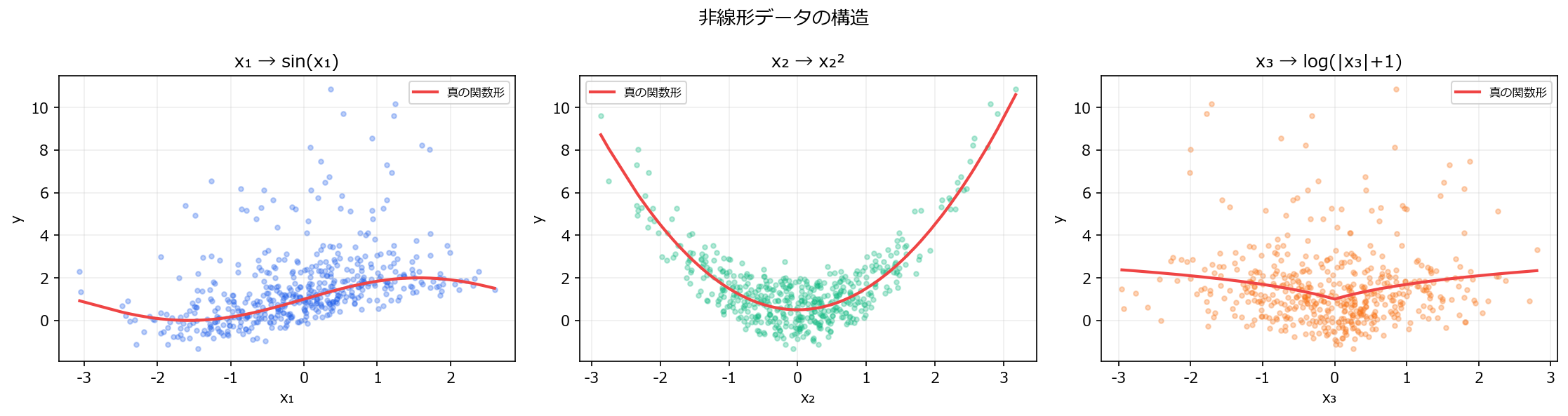
  • y = sin(x₁) + x₂² + log(|x₃|+1) + ε の非線形データで、6つの回帰モデルと4つの前処理を比較する。
  • 線形モデルは前処理を変えても非線形パターンを捉えられず、R² が低い。
  • 木系モデル(RF, GBM)やカーネル法(SVR-RBF)は手動の特徴量エンジニアリングなしで非線形を学習する。

物理現象・生体反応・価格弾力性など、入力と出力の関係が直線ではないケースは実務に多い。線形モデルに多項式特徴量を加えれば部分的に対応できるが、真の関数形が不明な場合は木系モデルやカーネル法が有利になる。ここでは既知の非線形関数で生成した合成データを使い、各アプローチの限界と強みを検証する。


1. データの特徴 #

  • n=500、5変数(うち有効3変数、ノイズ2変数)
  • 真のモデル: y = sin(x₁) + x₂² + log(|x₃| + 1) + ε
  • x₄, x₅ はノイズ変数(y と無関係)
  • 各 x ∈ N(0, 1)

2. 合成データの生成 #

 1
 2
 3
 4
 5
 6
 7
 8
 9
10
11
12
13
14
15
16
17
18
19
20
21
22
23
24
25
26
27
28
29
30
31
32
33
34
35
36
37
import numpy as np
import pandas as pd
import matplotlib.pyplot as plt

rng = np.random.default_rng(42)
n = 500

X = rng.normal(0, 1, size=(n, 5))
y = np.sin(X[:, 0]) + X[:, 1]**2 + np.log(np.abs(X[:, 2]) + 1) + rng.normal(0, 0.3, n)
feature_names = ["x₁", "x₂", "x₃", "x₄(noise)", "x₅(noise)"]

fig, axes = plt.subplots(1, 3, figsize=(15, 4))

# 各特徴量とyの関係
for i, (ax, fname, color) in enumerate(zip(axes, ["x₁ → sin(x₁)", "x₂ → x₂²", "x₃ → log(|x₃|+1)"],
                                            ["#2563eb", "#10b981", "#f97316"])):
    ax.scatter(X[:, i], y, alpha=0.3, s=10, color=color)

    # 真の関数を重ねる
    x_sort = np.sort(X[:, i])
    if i == 0:
        y_true = np.sin(x_sort) + 1.0  # 他の項の期待値を加算
    elif i == 1:
        y_true = x_sort**2 + 0.5
    else:
        y_true = np.log(np.abs(x_sort) + 1) + 1.0

    ax.plot(x_sort, y_true, color="#ef4444", linewidth=2, label="真の関数形")
    ax.set_title(fname)
    ax.set_xlabel(feature_names[i])
    ax.set_ylabel("y")
    ax.legend(fontsize=8)
    ax.grid(alpha=0.2)

fig.suptitle("非線形データの構造", fontsize=13)
fig.tight_layout()
plt.show()

非線形データの構造

3. 比較するパイプライン #

前処理説明
なし生の特徴量のみ
PolynomialFeatures(2)2次の交互作用と二乗項を追加
StandardScaler標準化のみ
Poly(2) + Scaler多項式 + 標準化
モデル特徴
Linear最小二乗法
RidgeL2正則化
SVR(RBF)カーネル法(非線形対応)
KNN近傍ベース
RFランダムフォレスト
GBM勾配ブースティング

4. 実験と結果 #

 1
 2
 3
 4
 5
 6
 7
 8
 9
10
11
12
13
14
15
16
17
18
19
20
21
22
23
24
25
26
27
28
29
30
31
32
33
34
35
36
37
38
39
40
41
42
43
44
45
46
47
48
49
50
51
52
53
54
55
56
57
58
59
60
61
62
63
64
65
66
67
68
69
70
71
72
73
74
75
76
77
78
79
80
81
82
83
84
85
from sklearn.model_selection import cross_val_score, KFold
from sklearn.linear_model import LinearRegression, Ridge
from sklearn.svm import SVR
from sklearn.neighbors import KNeighborsRegressor
from sklearn.ensemble import RandomForestRegressor, GradientBoostingRegressor
from sklearn.preprocessing import StandardScaler, PolynomialFeatures
from sklearn.pipeline import Pipeline
from sklearn.base import clone
import seaborn as sns

cv = KFold(n_splits=5, shuffle=True, random_state=42)

def make_pipeline(mdl, poly=False, scale=False):
    steps = []
    if poly:
        steps.append(("poly", PolynomialFeatures(degree=2, include_bias=False)))
    if scale:
        steps.append(("scaler", StandardScaler()))
    steps.append(("reg", mdl))
    return Pipeline(steps) if len(steps) > 1 else mdl

models = {
    "Linear": LinearRegression(),
    "Ridge": Ridge(alpha=1.0),
    "SVR(RBF)": SVR(kernel="rbf", C=10),
    "KNN": KNeighborsRegressor(n_neighbors=10),
    "RF": RandomForestRegressor(n_estimators=100, random_state=42),
    "GBM": GradientBoostingRegressor(n_estimators=100, random_state=42),
}

preprocs = {
    "なし": {"poly": False, "scale": False},
    "Poly(2)": {"poly": True, "scale": False},
    "Scaler": {"poly": False, "scale": True},
    "Poly+Scaler": {"poly": True, "scale": True},
}

results = []
for prep_name, prep_cfg in preprocs.items():
    for mdl_name, mdl in models.items():
        pipe = make_pipeline(clone(mdl), **prep_cfg)
        try:
            mae_scores = -cross_val_score(pipe, X, y, cv=cv, scoring="neg_mean_absolute_error")
            r2_scores = cross_val_score(pipe, X, y, cv=cv, scoring="r2")
            results.append({
                "前処理": prep_name, "モデル": mdl_name,
                "MAE": mae_scores.mean(), "R²": r2_scores.mean(),
            })
        except Exception:
            results.append({
                "前処理": prep_name, "モデル": mdl_name,
                "MAE": np.nan, "R²": np.nan,
            })

df_res = pd.DataFrame(results)

fig, axes = plt.subplots(1, 2, figsize=(14, 5))

pivot_r2 = df_res.pivot_table(index="前処理", columns="モデル", values="R²")
prep_order = ["なし", "Poly(2)", "Scaler", "Poly+Scaler"]
mdl_order = ["Linear", "Ridge", "SVR(RBF)", "KNN", "RF", "GBM"]
pivot_r2 = pivot_r2.reindex(index=[p for p in prep_order if p in pivot_r2.index],
                            columns=[m for m in mdl_order if m in pivot_r2.columns])

sns.heatmap(pivot_r2, annot=True, fmt=".3f", cmap="RdYlGn",
            linewidths=0.5, ax=axes[0], vmin=0, vmax=1,
            cbar_kws={"label": "R²(高いほど良い)"})
axes[0].set_title("前処理 × モデル: R² ヒートマップ")
axes[0].set_xlabel("")
axes[0].set_ylabel("")

pivot_mae = df_res.pivot_table(index="前処理", columns="モデル", values="MAE")
pivot_mae = pivot_mae.reindex(index=[p for p in prep_order if p in pivot_mae.index],
                              columns=[m for m in mdl_order if m in pivot_mae.columns])

sns.heatmap(pivot_mae, annot=True, fmt=".3f", cmap="RdYlGn_r",
            linewidths=0.5, ax=axes[1],
            cbar_kws={"label": "MAE(低いほど良い)"})
axes[1].set_title("前処理 × モデル: MAE ヒートマップ")
axes[1].set_xlabel("")
axes[1].set_ylabel("")

fig.suptitle("非線形データ: 前処理 × モデル 精度比較", fontsize=13)
fig.tight_layout()
plt.show()

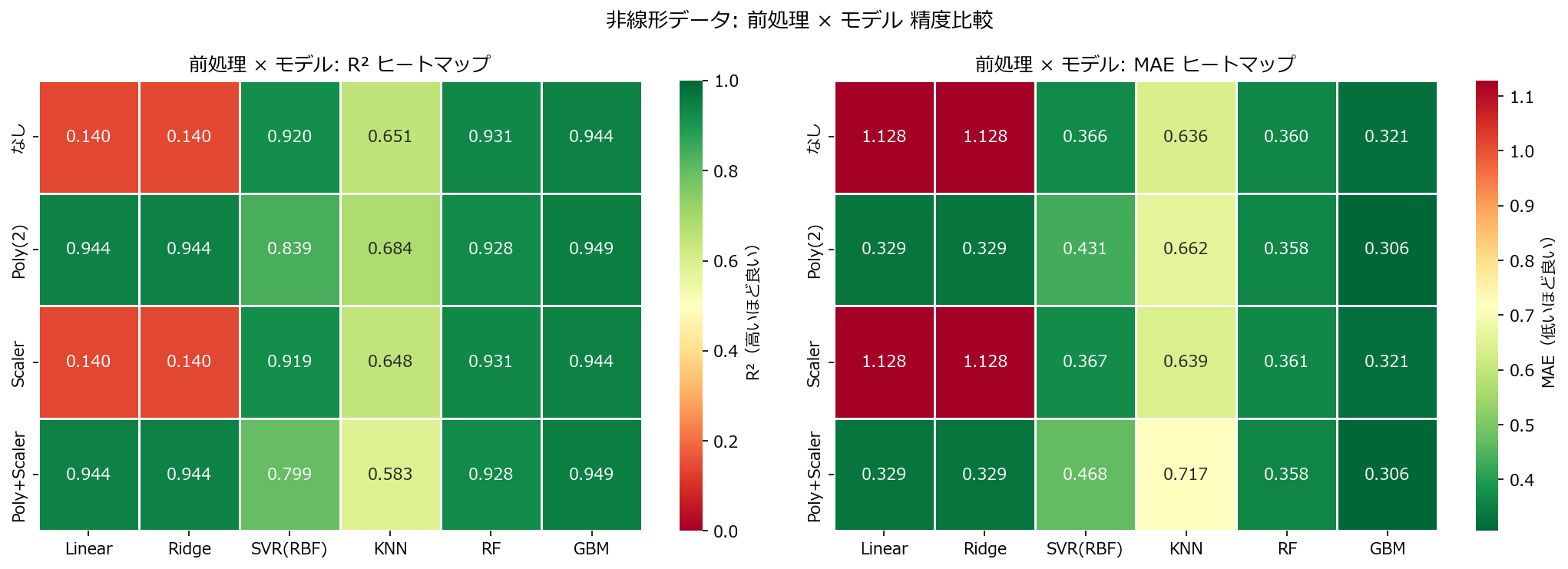
精度比較ヒートマップ

読み方のポイント #

  • 線形モデル(Linear, Ridge)は前処理を変えても R² が低い。sin() や log() は多項式では近似しきれない。
  • PolynomialFeatures(2) を追加すると x₂² の項を一部捉えられるため、線形モデルの R² がわずかに改善する。
  • RF・GBM は前処理なしでも高い R² を出す。木の分岐が非線形関数を自動的に近似するため。
  • SVR(RBF) はスケーリングが効くと大幅に改善する(カーネル法は距離ベースのため)。

5. 誤差パターン分析 #

 1
 2
 3
 4
 5
 6
 7
 8
 9
10
11
12
13
14
15
16
17
18
19
20
21
22
23
24
25
26
27
28
29
from sklearn.model_selection import train_test_split
from sklearn.base import clone

X_tr, X_te, y_tr, y_te = train_test_split(X, y, test_size=0.3, random_state=42)

configs = [
    ("Linear(生データ)", LinearRegression(), False, False),
    ("Ridge + Poly(2)", Ridge(alpha=1.0), True, False),
    ("GBM(生データ)", GradientBoostingRegressor(n_estimators=100, random_state=42), False, False),
]

fig, axes = plt.subplots(1, 3, figsize=(15, 4))
for i, (name, mdl, poly, scale) in enumerate(configs):
    pipe = make_pipeline(clone(mdl), poly=poly, scale=scale)
    pipe.fit(X_tr, y_tr)
    pred = pipe.predict(X_te)
    residuals = y_te - pred

    axes[i].scatter(pred, residuals, alpha=0.4, s=15, color="#2563eb")
    axes[i].axhline(0, color="#ef4444", linewidth=1, linestyle="--")
    r2 = 1 - np.sum(residuals**2) / np.sum((y_te - np.mean(y_te))**2)
    axes[i].set_title(f"{name}\nR²={r2:.3f}", fontsize=10)
    axes[i].set_xlabel("予測値")
    axes[i].set_ylabel("残差")
    axes[i].grid(alpha=0.2)

fig.suptitle("残差パターンの比較(テストデータ)", fontsize=13)
fig.tight_layout()
plt.show()

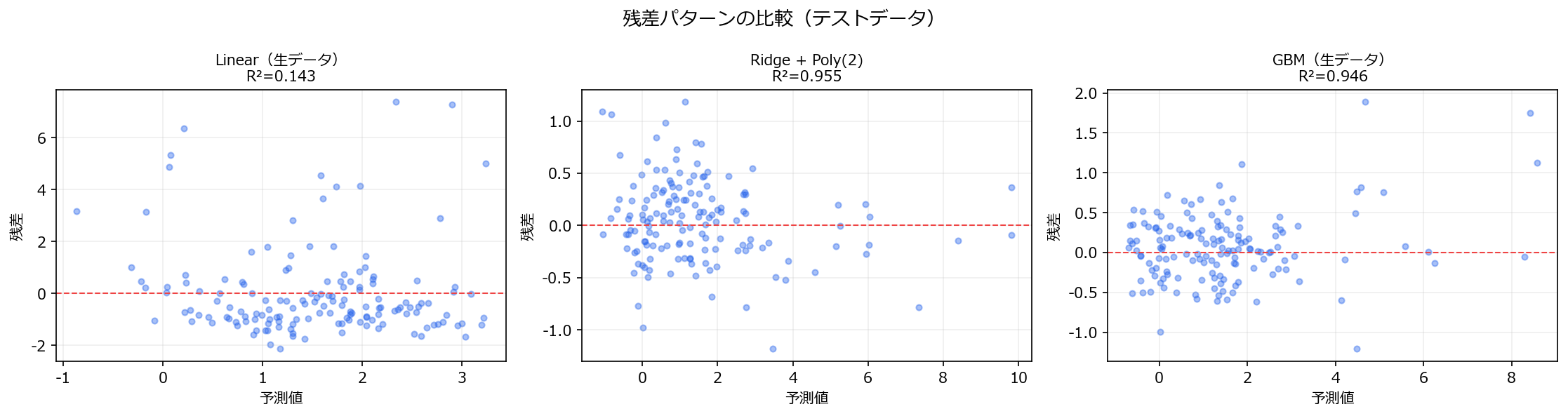
残差パターン比較

線形モデルの残差には明確なパターン(曲線状の構造)が残る。これは「モデルが捉えきれていない非線形成分」の証拠。GBM の残差はランダムに散らばり、系統的パターンがない。


6. よくある失敗パターン #

  • 残差プロットを見ずに R² だけで判断する: R²=0.7 でも残差に曲線パターンがあれば、非線形性を見落としている。
  • PolynomialFeatures の次数を上げすぎる: degree=3 以上で特徴量数が爆発し、過学習のリスクが急増する。交差検証で適切な次数を選ぶ。