K_DM Book
用語集
対象者 標準
対象者別の入口 →

対象者の設定はこのブラウザの中にだけ保存されます。

言語 JA

主成分回帰 (PCR)

中級

02.1.8

主成分回帰 (PCR)

最終更新 2020-05-06 読了時間 4 分
まとめ
主成分回帰(PCR)は、説明変数を PCA で分散の大きい順に並べ替えた主成分スコアに変換し、上位 \(k\) 本だけを使って線形回帰を行う手法です。相関の強い列は同じ主成分にまとまるので、最小二乗法で係数が暴れる多重共線性の問題を、列を選ばずに緩和できます。このページでは糖尿病データ(442 人・10 特徴量)で StandardScaler → PCA → LinearRegression の Pipeline を組み、主成分数 \(k\) を 1〜10 まで変えて 5 分割交差検証の MSE が最小になる \(k\) を選びます。読み終えると、explained_variance_ratio_ と CV の MSE の折れ線を見て \(k\) を決められるようになります。

主成分分析(PCA) で「分散が最大の向きに軸を取り直す」操作と寄与率の意味を押さえておくと、PCR はその軸の上で LinearRegression を走らせるだけだと分かります。

直感 #

血圧と BMI のように相関の強い説明変数が並ぶと、最小二乗法は「血圧の係数を +10、BMI の係数を −9」のような打ち消し合う解を返しやすく、データを少し変えると符号まで入れ替わります。PCR はまず PCA で 10 本の列を「互いに無相関な 10 本の主成分」に作り直し、分散の大きい順に並べます。そのうち上位 \(k\) 本だけを使って回帰すれば、相関で生じていた不安定な方向(分散の小さい下位の主成分)が最初から回帰に入りません。残す本数 \(k\) が唯一の調整パラメータで、\(k = 10\) なら通常の線形回帰と同じ結果に戻ります。

何が起きているか(ステップで見る) #

コードを読む前に、この手法が図の上で何をしているかを追ってみましょう。「再生」を押すか、スライダーを動かすと 1 手順ずつ進みます。

見るポイント:点を軸に射影した散らばりが最大の向きが第 1 主成分。情報を最も失わない 1 本の軸。PCR はこの軸への射影座標(主成分スコア)を LinearRegression の入力にします。

式で書くとどこで圧縮しているか #

記号を出す前に一言でいうと、\(\mathbf{W}_k\) が「残す軸の向き」、\(\mathbf{Z}\) が「各サンプルをその軸に射影した座標」で、回帰はこの \(\mathbf{Z}\) に対して行います。標準化した説明変数行列 \(\mathbf{X}\) に PCA を適用し、固有値の大きいものから \(k\) 個の主成分を選びます。主成分スコアを \(\mathbf{Z} = \mathbf{X} \mathbf{W}_k\) とすると、回帰モデルは

$$ y = \boldsymbol{\gamma}^\top \mathbf{Z} + b $$

で学習されます。最終的に元の特徴量空間の係数は \(\boldsymbol{\beta} = \mathbf{W}_k \boldsymbol{\gamma}\) として復元できます。主成分数 \(k\) は累積寄与率(たとえば 90% を超える最小の \(k\))か、下のコードのように交差検証の MSE で選びます。

Pythonを用いた実験や説明 #

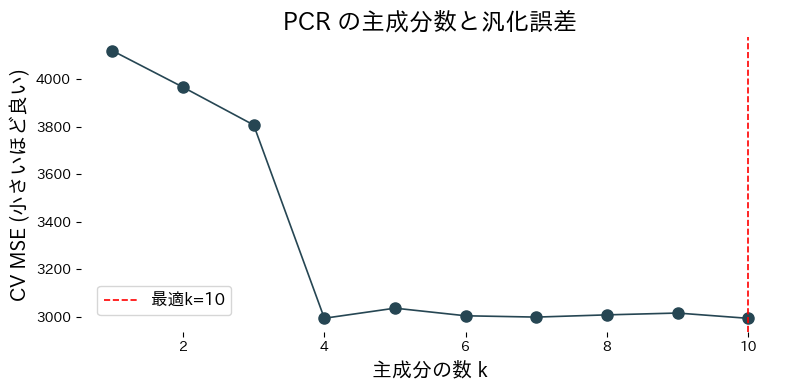
次のコードは、糖尿病データ(442 人・10 特徴量)に対して StandardScaler → PCA(n_components=k) → LinearRegression の Pipeline を組み、\(k\) を 1 から 10 まで変えて 5 分割交差検証の MSE を折れ線で描きます。MSE が最小になる \(k\) を赤い破線で示し、その \(k\) で学習し直したモデルの寄与率を表示します。

 1
 2
 3
 4
 5
 6
 7
 8
 9
10
11
12
13
14
15
16
17
18
19
20
21
22
23
24
25
26
27
28
29
30
31
32
33
34
35
36
37
38
39
40
41
42
43
44
45
46
47
48
49
50
51
52
53
54
55
56
57
58
59
60
61
62
63
64
65
66
67
68
69
70
71
72
73
74
75
76
77
78
79
80
81
82
83
84
85
86
from __future__ import annotations

import matplotlib.pyplot as plt
import numpy as np
from sklearn.datasets import load_diabetes
from sklearn.decomposition import PCA
from sklearn.linear_model import LinearRegression
from sklearn.model_selection import cross_val_score
from sklearn.pipeline import Pipeline
from sklearn.preprocessing import StandardScaler

def evaluate_pcr_components(
    cv_folds: int = 5,
    xlabel: str = "Number of components k",
    ylabel: str = "CV MSE (lower is better)",
    title: str | None = None,
    label_best: str = "best={k}",
) -> dict[str, float]:
    """Cross-validate PCR with varying component counts and plot the curve.

    Args:
        cv_folds: Number of folds for cross-validation.
        xlabel: Label for the component-count axis.
        ylabel: Label for the error axis.
        title: Optional title for the plot.
        label_best: Format string for highlighting the best component count.

    Returns:
        Dictionary containing the best component count and its CV score.
    """
    X, y = load_diabetes(return_X_y=True)

    def build_pcr(n_components: int) -> Pipeline:
        return Pipeline([
            ("scale", StandardScaler()),
            ("pca", PCA(n_components=n_components, random_state=0)),
            ("reg", LinearRegression()),
        ])

    components = np.arange(1, X.shape[1] + 1)
    cv_scores = []
    for k in components:
        model = build_pcr(int(k))
        score = cross_val_score(
            model,
            X,
            y,
            cv=cv_folds,
            scoring="neg_mean_squared_error",
        )
        cv_scores.append(score.mean())

    cv_scores_arr = np.array(cv_scores)
    best_idx = int(np.argmax(cv_scores_arr))
    best_k = int(components[best_idx])
    best_mse = float(-cv_scores_arr[best_idx])

    best_model = build_pcr(best_k).fit(X, y)
    explained = best_model["pca"].explained_variance_ratio_

    fig, ax = plt.subplots(figsize=(8, 4))
    ax.plot(components, -cv_scores_arr, marker="o")
    ax.axvline(best_k, color="red", linestyle="--", label=label_best.format(k=best_k))
    ax.set_xlabel(xlabel)
    ax.set_ylabel(ylabel)
    if title:
        ax.set_title(title)
    ax.legend()
    fig.tight_layout()
    plt.show()

    return {
        "best_k": best_k,
        "best_mse": best_mse,
        "explained_variance_ratio": explained,
    }

metrics = evaluate_pcr_components(
    xlabel="主成分の数 k",
    ylabel="CV MSE (小さいほど良い)",
    title="PCR の主成分数と汎化誤差",
    label_best="最適k={k}",
)
print(f"最適な主成分数: {metrics['best_k']}")
print(f"最適CV MSE: {metrics['best_mse']:.3f}")
print("寄与率:", metrics['explained_variance_ratio'])

糖尿病データセットを使って主成分数ごとの交差検証スコアを比較しますの図

実行結果の読み方 #

折れ線は \(k\) が小さいうちは急に下がり、途中から平らになります。赤い破線の best_k が 10 より小さければ、下位の主成分を捨てても交差検証の MSE は悪くならない、つまり多重共線性で不安定だった方向を落として損をしていないと読めます。best_k = 10 なら PCR は通常の 線形回帰 と同じ結果です。explained_variance_ratio の累積和を見て、選んだ \(k\) で元の分散の何割を残したかも確認してください。

使いどころと落とし穴 #

説明変数が数十本あって相関が強く、しかも「どの列を削るか」を手で決めたくないときに PCR が向きます。落とし穴の 1 つ目は、PCA が \(\mathbf{y}\) を見ずに軸を決めることです。分散は小さいが \(\mathbf{y}\) に効く方向が下位の主成分に入ると、\(k\) を減らした時点で予測に必要な情報が消えます。この弱点を補うのが \(\mathbf{y}\) との共分散で軸を決める PLS 回帰 です。2 つ目は解釈で、主成分は 10 列の混合なので「BMI が 1 増えると」のような係数の読み方はできず、必要なら \(\boldsymbol{\beta} = \mathbf{W}_k \boldsymbol{\gamma}\) で元の空間に戻します。

参考文献 #

  • Jolliffe, I. T. (2002). Principal Component Analysis (2nd ed.). Springer.
  • Massy, W. F. (1965). Principal Components Regression in Exploratory Statistical Research. Journal of the American Statistical Association, 60(309), 234–256.