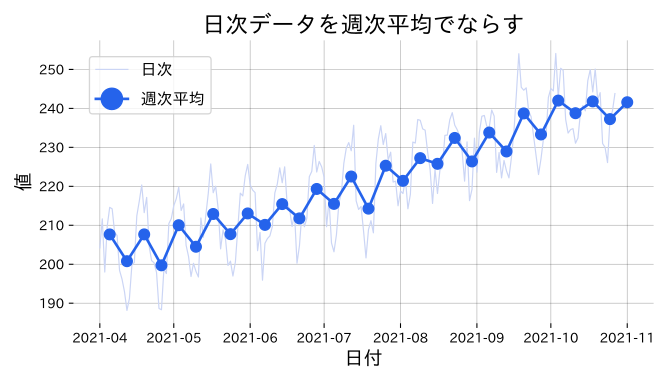
まとめ- 日次データを週次平均にリサンプリングしてトレンドを抽出する。
pandas.Series.resample("W-MON").mean()で集約し、日次と重ねて描画する。- 短期ノイズを平滑化して中長期の傾向を把握したいときに使う。
粒度の細かい日次データを週単位にまとめると、短期のノイズをならしながらトレンドを追いやすくなります。
 1
 2
 3
 4
 5
 6
 7
 8
 9
10
11
12
13
14
15
16
17
18
19
20
21
22
23
24
| import numpy as np
import pandas as pd
import matplotlib.pyplot as plt
rng = np.random.default_rng(6)
dates = pd.date_range("2021-04-01", periods=210, freq="D")
base = 200 + 0.2 * np.arange(len(dates))
seasonal = 10 * np.sin(2 * np.pi * np.arange(len(dates)) / 14)
noise = rng.normal(0, 4, size=len(dates))
daily = pd.Series(base + seasonal + noise, index=dates)
weekly_mean = daily.resample("W-MON").mean()
fig, ax = plt.subplots(figsize=(7, 4))
ax.plot(daily.index, daily, color="#cbd5f5", linewidth=0.9, label="日次")
ax.plot(weekly_mean.index, weekly_mean, color="#2563eb", linewidth=2, marker="o", label="週次平均")
ax.set_title("日次データを週次平均でならす")
ax.set_xlabel("日付")
ax.set_ylabel("値")
ax.legend()
ax.grid(alpha=0.3)
fig.tight_layout()
fig.savefig("static/images/timeseries/resample_weekly.svg")
|
読み方のポイント
#
- 週次平均を重ねると、日次の細かな起伏を意識しつつも大まかなトレンドが把握できる。
- 平均の代わりに合計や中央値を採用すれば、売上集計やノイズ耐性が必要な場面にも対応できる。
- リサンプリング単位は業務の意思決定サイクルに合わせて柔軟に設定する。